Review vessel activity, explain uncertainty and share a record another person can follow. Bring the same discipline to marine insurance, operational reviews and commercial investigations.
A claim, an operational question and a commercial review all benefit from a clear distinction between an observation, an interpretation and a missing fact. TITUS helps organize that review around the available vessel evidence.
01 / MARINE INSURANCE
Claims investigation & underwriting review
Bring incident details, vessel observations and analyst findings into one case. Show what supports the review, what contradicts it and which questions need independent evidence.
A structured record for a qualified reviewer to examine.
02 / OPERATIONS
Operators, charterers & logistics teams
Examine a reported movement or observation gap, record the available context and give colleagues a clearer handover. Preserve what was reviewed when an operational question arose.
A practical starting point for follow-up and coordination.
03 / DUE DILIGENCE
Compliance & commercial investigators
Use an asset-led case to document questions, source references and analyst reasoning. Keep supporting and contradicting observations visible before deciding which external checks to pursue.
An explainable review that keeps uncertainty in view.
04 / COMMERCIAL RELATIONSHIPS
Owners, brokers & advisers
Prepare a common record for a vessel-related enquiry or discussion. Share captured observations and a readable report so another person can understand the basis of the review.
A clearer handover between teams and stakeholders.
THE WORKFLOW
Move from a question to a reviewable record.
Keep the evidence beside the reasoning. Each step helps another reviewer understand how you reached the next question.
Find the MMSI, confirm the identity and review the available source and observation time.
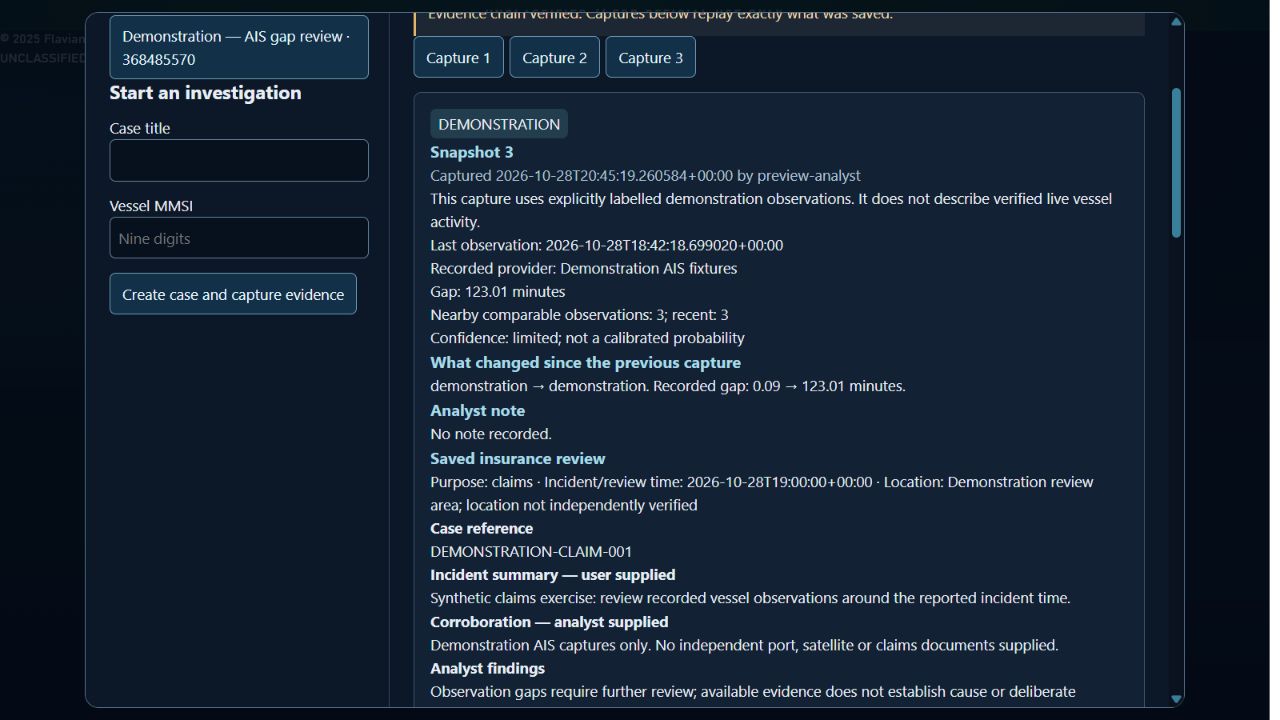
Preserve what you examined
Save frozen observations, add notes and revisit earlier captures as the review develops.
Explain how the evidence relates
Link a finding to supporting, contradicting or contextual captures. Record why each link matters.
Share the findings and the open questions
Export a readable HTML report or structured JSON record, with source context and limitations retained.
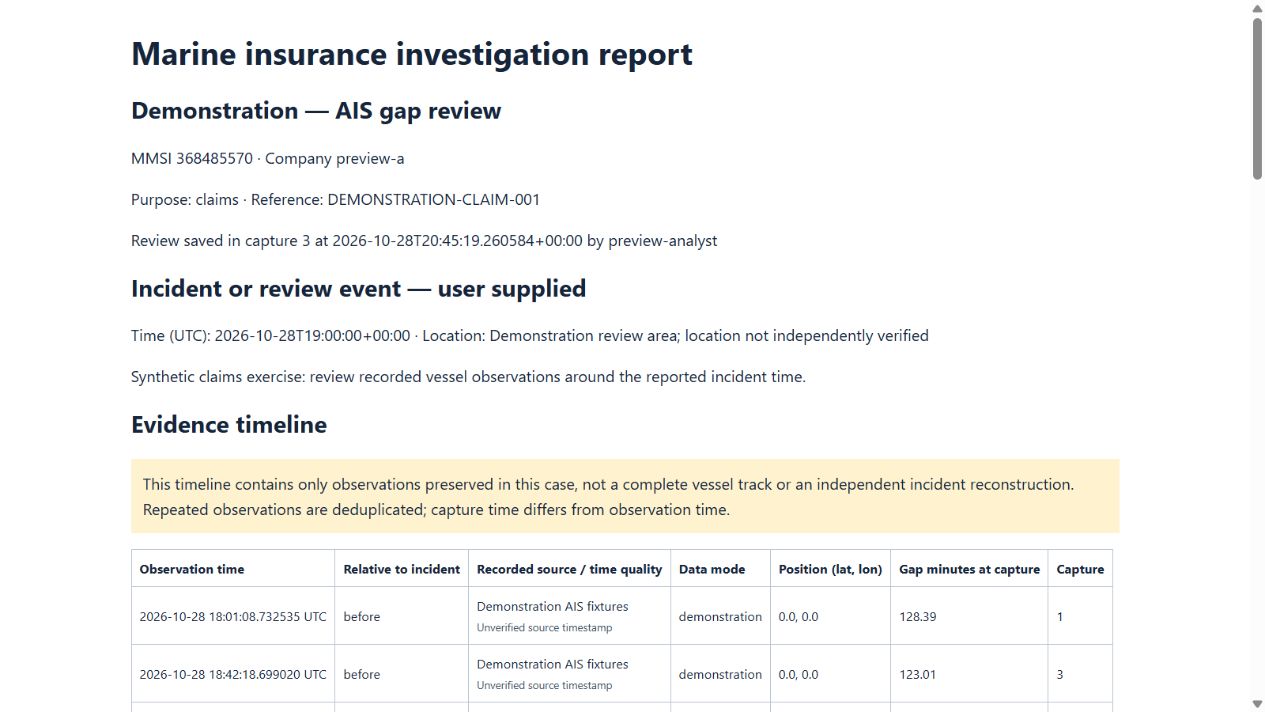
Demonstration report · synthetic case, not a real claim.
A USEFUL HANDOVER
Give the next reviewer the context, too.
A useful report shows more than a conclusion. Preserve the available source and timestamp, the captured observations, the analyst's interpretation and the evidence still needed.
Incident or review details and analyst notes
Supporting and contradicting evidence links
Saved captures that can be revisited
Confidence qualifications and unresolved questions
Check who supplied an observation and when it was reported. A page refresh or capture time does not establish that the underlying position is current.
Observations and interpretation
Keep provider observations separate from user-supplied incident details and analyst conclusions. An AIS gap alone does not establish deliberate shutdown, cause or misconduct.
Consistency and corroboration
The pilot checks consistency of its saved evidence chain. That does not independently authenticate every source, document or physical event; corroboration may still be needed.
PRACTICAL QUESTIONS
Confirm the fit for your team.
Start with your investigation questions, intended report recipients and required data scope. A demonstration can show where the current workflow helps and what still needs to be agreed.
Do we need an insurance team to use this?
No. Vessel-related operational reviews, commercial enquiries and due diligence can use the same approach: record the question, preserve observations and explain the reasoning. Marine insurance fields support claims or underwriting review in the pilot.
Does this include aircraft investigations?
The main TITUS dashboard supports aircraft search and movement review. The frozen case captures and insurance reports described here currently apply to vessels; equivalent aircraft case capture is not established as available.
Can our company start using it today?
The vessel case workflow is a restricted administrator pilot. Request a demonstration to evaluate it. General company provisioning, agreed data-use rights, recovery arrangements and commercial access are still in preparation.
Can we upload supporting documents?
The pilot accepts analyst-supplied document references as text. Attachment storage and independent document authentication are not available. Avoid entering unnecessary personal information.
Does a report decide coverage, liability or fraud?
No. Reports support human investigation and due diligence. They do not make insurance decisions, certify an audit or guarantee legal admissibility. Qualified reviewers must assess the evidence and context.
SEE THE WORKFLOW FOR YOURSELF
Bring a question. Explore a clearer way to review it.
Tell us the vessel activity, operational issue or evidence handover your team needs to understand.